Official Android release

Install AccessRA from Google Play

Search AccessRA in Google Play or open the official listing. Calibration readings are entered by the technician; images are used for documentation.

View on Google Play ↗
Loading…
Skip to main content
AccessRA

AccessRA · Android · Available on Google Play

Practical field tools for instrumentation and calibration work.

Use focused engineering calculations, follow a structured pressure-gauge calibration workflow and keep practical records from one mobile workspace.

Current availability

AccessRA is published on Google Play for Android. Install the current release directly from the official store listing.
Offline-oriented Core tools and local records are designed for field use without continuous connectivity.
Technician-entered readings Calibration readings remain under technician control; photos support documentation rather than measurement decisions.
Production release Available on Google Play; field feedback continues to inform improvements.
AccessRA field workspace
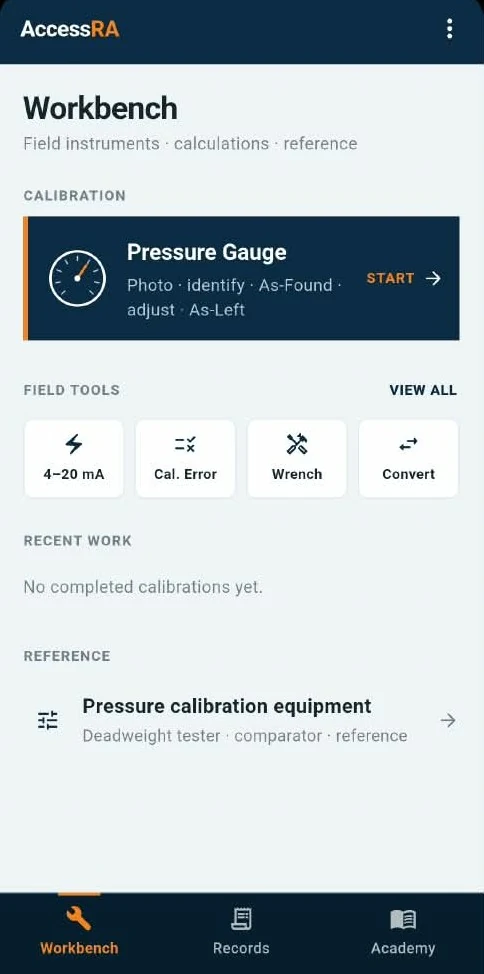
Actual AccessRA Android Workbench screen showing pressure gauge calibration, field tools, records and Academy

Current Android release

Focused on work technicians actually repeat.

The current release prioritizes pressure-gauge calibration, field calculations and local records. Other instrument modules are not presented as available features.

01

Calibration

Pressure-gauge workflow

Guide the calibration record from instrument identification through as-found and as-left readings while keeping the technician responsible for the actual indicated value and maintenance decision.
  • Instrument identification and optional supporting photographs
  • Flexible technician-entered pressure points
  • As-found and as-left readings
  • Result and record review
  • Local calibration history
Calibration workflow in AccessRA
02

Field tools

Fast instrumentation calculations

Keep common signal calculations and worksheets close to the job without carrying a large engineering application into every field task.
  • 4–20 mA scaling
  • 3–15 psi scaling
  • Five-point calibration worksheet
  • Selected field unit conversions
  • Broader calculations available through the AccessRA web Toolbox
Open the broader web Toolbox →
AccessRA field tools
03

Records

Keep the calibration context

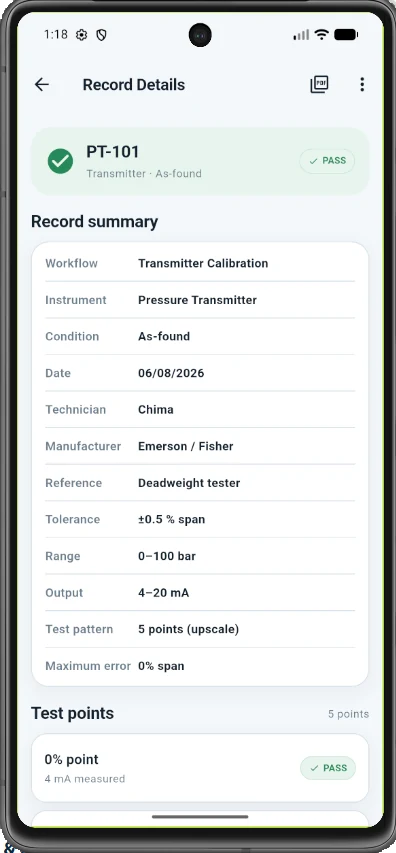
Store practical calibration records so the readings, instrument details and result remain together instead of being rewritten across separate notes.
  • Searchable local records
  • Instrument details and calibration points
  • As-found / as-left history
  • Pass/fail record where applicable
  • Delete and review controls
AccessRA calibration record details

Designed around the job

Identify. Calibrate. Review. Keep the record.

AccessRA supports the technician's workflow; it does not replace the approved calibration procedure, reference standard or engineering judgement.

01

Identify

Record the instrument

Capture the instrument details needed to distinguish the gauge and its calibration range before testing.

02

Calibrate

Enter actual readings

Apply the reference pressure using the applicable procedure and enter the observed gauge indication at each point.

03

Review

Retain the record

Review the as-found/as-left data and keep the completed calibration record available on the device.

Product direction

One stable workflow before the next instrument module.

The production application prioritizes a dependable pressure-gauge workflow rather than a long list of unfinished modules. Additional instrument workflows will follow only when technically validated.

Field-first UICompact work surfaces and direct input instead of long explanatory screens.
Evidence without automatic measurementPhotos support identification and documentation; the technician remains responsible for calibration readings.
Local-first recordsCore calibration records remain useful even where connectivity is unreliable.
Connected to AccessRA AcademyThe Academy teaches the procedure and reasoning; AccessRA supports the practical workflow.

Official Android release

Install AccessRA from Google Play

Search AccessRA in Google Play or open the official listing. Calibration readings are entered by the technician; images are used for documentation.

View on Google Play ↗